ReadyFS RUN guide
Updated 13 October 2026 for DOS-style batch scripting. This reference is also included in the illustrated user guide.
RUN scripts: parameters, previews and reliable execution
RUN script-path [arg1 ... arg9] (short form RU) executes a text script of ReadyFS commands in the overlay application with working REU and sidecars. It reads and stages the whole file, closes its input stream, then dispatches commands one at a time. This is ReadyFS command scripting; it does not load and start a C64 PRG or BASIC program.
What parameters belong where?
| Where | Example | Meaning |
|---|---|---|
| RUN invocation | RUN @lab:/INSPECT.SEQ |
Script path, optionally followed by up to nine arguments. |
| Short invocation | RU 8:/INSPECT |
Same command; use the actual disk directory name. IEC names do not automatically gain .SEQ. |
| Quoted script path | RUN "@lab:/INSPECT NOTES.SEQ" |
One path containing spaces. |
| Inside the script | COPY @src:/README.SEQ @dst:/README.SEQ --whatif |
COPY receives its source, destination and options. |
| Session setup | ALIAS SRC u:/usb1/READYFS_TEST/YOUR_FRESH_RUN/source |
An alias supplies a reusable location to script commands. |
DOS-style variables and flow control
The current overlay build supports session variables, saved variables, script arguments, branches, counted loops and label subroutines. Type HELP BATCH or HELP SET on the C64 for the compact reference.
| Command or expansion | Behavior |
|---|---|
SET NAME=value |
Set a session variable. A plain SET changes an existing saved variable to session-only. |
SET /P NAME=value |
Mark this variable for the next CONFIG SAVE. /P means persistent in ReadyFS. |
SET NAME= |
Delete a variable, including its persistent flag. |
SET / SET NAME |
List variables with /P markers, or show one value. |
%NAME% / %ERRORLEVEL% |
Expand a variable or the preceding command result. Undefined variables expand to empty text. Names are case-insensitive. ERRORLEVEL is read-only. |
%0, %1 … %9 |
Script path and up to nine RUN arguments. Missing arguments expand to empty text. |
%% |
Insert a literal percent sign. |
SET /A N=N+1 |
Evaluate an unsigned 16-bit integer, or one addition/subtraction. Operands are decimal literals or variable names; undefined operands are zero. Results wrap at 65536. Use SET /P /A to retain the persistent flag. |
ECHO text / REM comment |
Print text or ignore the whole line. Whole-line # comments also work. |
:LABEL / GOTO LABEL |
Declare a label or jump to it. Labels are case-insensitive, up to 16 bytes; the first matching label wins. |
CALL :LABEL |
Run a label subroutine in the same staged script, sharing variables and arguments. Maximum nesting: eight. |
EXIT /B [code] / GOTO :EOF |
Return from a subroutine, or finish the top-level script. EXIT /B can set a result from 0 to 255. Reaching the physical end of a subroutine also returns. |
IF [NOT] ERRORLEVEL n command |
Run the command when the preceding result is greater than or equal to n, optionally negated. |
IF [NOT] DEFINED name command |
Test whether a variable exists. |
IF [NOT] EXIST path command |
Test the filesystem through ReadyFS's normal path and backend handling. A lookup failure stops the script with result 8. |
IF [NOT] "a"=="b" command |
Compare exact, case-sensitive strings. A spaced a == b comparison also works. |
IF [NOT] n EQU|NEQ|LSS|LEQ|GTR|GEQ n command |
Compare unsigned integers from 0 to 65535. Expand variables explicitly, for example IF %N% LSS 3 GOTO LOOP. |
For example, save this with real line breaks and run RUN 8:/COUNT WORLD:
REM ARGUMENTS AND A COUNTED LOOP
SET WHO=%1
SET /A N=0
:LOOP
SET /A N=N+1
ECHO HELLO "%WHO%" %N%
IF %N% LSS 3 GOTO LOOP
CALL :FINISH
EXIT /B 0
:FINISH
ECHO DONE
EXIT /B
Expansion happens once before tokenization on each executed line. Quote an expanded value when it must remain one argument: COPY "%SOURCE%" "%TARGET%". Values are not expanded recursively. To write literal variable references into a script from the interactive prompt, double their percent signs, for example WRITE 8:/SHOW "ECHO %%NAME%%" --line. RUN arguments such as --yes are ordinary %1/%2 values; they do not become global confirmation or preview options. Put those options on the intended operation inside the script.
There are 16 variable slots, with names up to 16 bytes and values up to 127 bytes. Names use letters, underscores and digits after the first character. Variables can be used interactively and inside scripts. CONFIG SAVE writes only variables marked /P, alongside the current directory and aliases, in the new RFC2 format. CONFIG LOAD validates the complete file before applying it, replaces the saved-variable set, and preserves unrelated session variables. A loaded saved variable takes precedence over a session variable with the same name. If the merged table would exceed 16 slots, loading fails without changing the session. Legacy RFC1 configs still load their directory and aliases and leave variables alone. Loading config is explicit after startup.
RUN remains bounded to a 16 KiB staged script and 255 bytes per expanded line, with at most 12 tokens. Tabs and spaces separate arguments; balanced double quotes can occur within an argument. Excess tokens, unmatched quotes and invalid expansion produce result 4 before command dispatch. Scripts stop after 10,000 executed lines to bound accidental loops; RUN/STOP cancels execution between interpreted lines with result 3. Filesystem operations retain their existing cancellation behavior. ONERROR STOP remains the default; use ONERROR CONTINUE before a command whose failure you intend to inspect with IF ERRORLEVEL. Comments, labels and false IF branches preserve the preceding result; SET and ECHO produce their own result.
This is a bounded DOS-style language. Loops use labels, arithmetic and conditional GOTO; CALL targets labels in the same file. Nested RUN, external-script CALL, FOR, SETLOCAL, pipes and redirection are not implemented. Scripts share aliases and the current directory, and relative paths resolve against that directory rather than the directory containing the script.
Parameters: arguments, environment and local subroutines
RUN supplies a new set of up to nine positional arguments for that top-level run. %0 is the script path; %1 through %9 are its inputs. Missing arguments become empty text. Use quotes to keep a path or value containing spaces together:
SET SOURCE=@lab:/source/readme.seq
SET TARGET=@lab:/saved notes.seq
RUN @lab:/BACKUP.SEQ "%SOURCE%" "%TARGET%" PREVIEW
Inside BACKUP.SEQ, %1 is the source, %2 the destination, and %3 the mode. The outer quotes group an argument and are not part of its value; quote it again when expanding it into a command. $1, %*, SHIFT and %~1 modifiers are not implemented. RUN options are not special: RUN file.seq --yes passes the ordinary string --yes as %1; confirmation must be on the intended filesystem command.
Named variables are session-wide. A script can read variables set at the prompt, and its changes remain after it returns. Aliases and the current directory also remain shared. There are no local scopes or automatic save/restore of working variables.
CALL :LABEL runs a subroutine in the same file. It accepts only the label: CALL :COPYONE source destination is not implemented. The routine sees the original RUN arguments and the shared named environment. Pass different inputs by setting named variables before each call:
SET WHO=ALPHA
CALL :GREET
SET WHO=BETA
CALL :GREET
EXIT /B 0
:GREET
ECHO HELLO %WHO%
GOTO :EOF
The two calls print ALPHA and BETA. GOTO :EOF returns to the caller; EXIT /B code also supplies a result. At top level both end the script. Calls can nest eight levels deep, but each level still shares named variables and the original RUN arguments. Keep the top-level EXIT /B before routine definitions to prevent execution from falling through into a routine.
Separate script files cannot call each other yet. Nested RUN and external-script CALL are unavailable. Two scripts run sequentially from the interactive prompt can exchange named variables. This differs from DOS 6.2, where CALL OTHER.BAT %1 %2 calls a separate file with its own positional arguments and returns when that file ends.
Worked example: preview and verify a single-file backup
This is the one downloadable example used in the appended physical C64 Ultimate video chapter. It takes source, destination and PREVIEW/APPLY arguments, refuses an existing destination on APPLY, calls a local copy/compare routine, and increments a session counter only after success. It deliberately does not replace an existing file. Create the destination's parent folder first.
Download BACKUP.SEQ. The download contains uppercase ASCII command and option bytes and real CR line endings, matching the physical recording fixture. Host-created script options must also use uppercase bytes (for example --WHATIF); do not rely on lowercase ASCII option spelling being normalized like interactive keyboard input.
REM BACKUP SOURCE DEST PREVIEW OR APPLY
ONERROR STOP
SET "SRC=%1"
SET "DST=%2"
IF "%SRC%"=="" GOTO USAGE
IF "%DST%"=="" GOTO USAGE
IF NOT EXIST "%SRC%" GOTO MISSING
IF "%3"=="PREVIEW" GOTO PREVIEW
IF NOT "%3"=="APPLY" GOTO USAGE
IF EXIST "%DST%" GOTO EXISTS
CALL :COPYONE
IF NOT DEFINED BACKUPS SET BACKUPS=0
SET /A BACKUPS=BACKUPS+1
ECHO BACKUPS THIS SESSION: %BACKUPS%
EXIT /B 0
:COPYONE
COPY "%SRC%" "%DST%"
COMPARE "%SRC%" "%DST%"
ECHO BACKUP VERIFIED
EXIT /B 0
:PREVIEW
COPY "%SRC%" "%DST%" --WHATIF
EXIT /B
:EXISTS
ECHO DEST EXISTS - CHOOSE NEW NAME
EXIT /B 6
:MISSING
ECHO SOURCE NOT FOUND: "%SRC%"
EXIT /B 5
:USAGE
ECHO RUN BACKUP SOURCE DEST PREVIEW
ECHO RUN BACKUP SOURCE DEST APPLY
EXIT /B 4
With LAB pointing at your own fresh test folder containing source/readme.seq and the downloaded script:
SET BACKUPS=0
TYPE @lab:/BACKUP.SEQ
RUN @lab:/BACKUP.SEQ @lab:/source/readme.seq @lab:/saved.seq PREVIEW
RUN @lab:/BACKUP.SEQ @lab:/source/readme.seq @lab:/saved.seq APPLY
TYPE @lab:/saved.seq
ECHO COMPLETED BACKUPS: %BACKUPS%
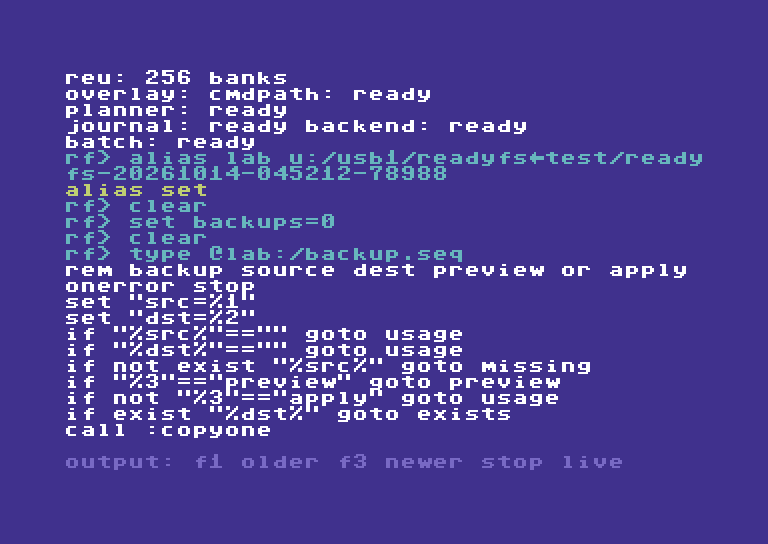
Physical C64 Ultimate: TYPE reads the real file; F1 reveals the earlier lines after streaming.
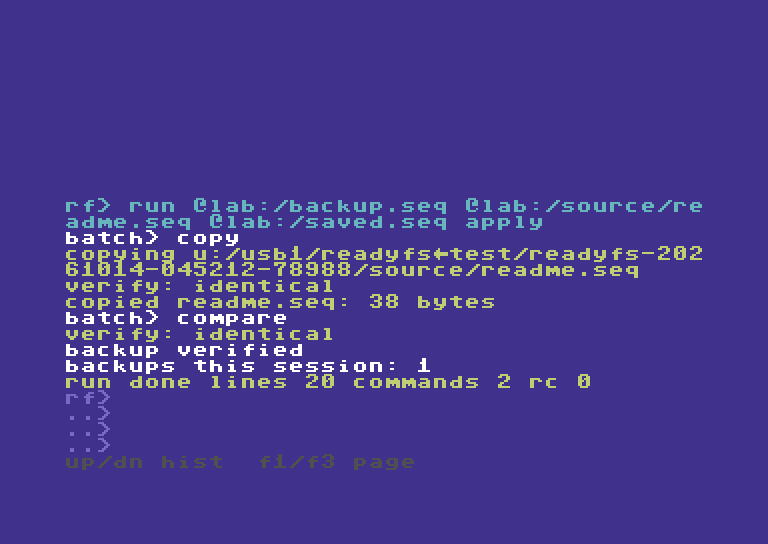
The actual APPLY run reports both verification checks, the shared counter and RUN result 0.
TYPE streams the file onto the display. Use F1 to enter output history and move to earlier lines, F3 for newer lines, and RUN/STOP to return to live input. The video reads both halves this way.
The preview writes nothing and does not increment BACKUPS. APPLY copies and compares, then reports BACKUPS THIS SESSION: 1 and result 0. Running APPLY again with the same destination prints DEST EXISTS - CHOOSE NEW NAME, returns 6 and leaves the count at 1. Missing source returns 5; absent arguments or a mode other than uppercase PREVIEW/APPLY return 4. An empty destination is checked before any write. The script uses three named variable slots: SRC, DST and BACKUPS.
STOP is deliberate: a failed copy or comparison terminates the whole run, including from inside CALL. Read the filesystem reports as well as the final RC; legacy result mapping is not complete and COPY/COMPARE are not a transaction. The preview is not a queued operation or proof of later write capability. BACKUPS counts successful script runs, not every copy ever made, and its arithmetic wraps after 65535. Avoid reusing these working variable names for unrelated session values.
More examples: conditions, loops, results and persistence
These short examples supplement the recorded backup script. They are reference recipes, not claims that every branch is demonstrated in the video.
Comments, missing parameters and literal percent signs
REM FULL-LINE DOS-STYLE COMMENT
# ANOTHER FULL-LINE COMMENT
ECHO SCRIPT: %0
IF "%1"=="" GOTO USAGE
ECHO FIRST ARGUMENT: "%1"
ECHO LITERAL PERCENT: 100%%
EXIT /B 0
:USAGE
ECHO PLEASE SUPPLY ONE ARGUMENT
EXIT /B 4
String, defined-variable and existence conditions
IF NOT DEFINED MODE SET MODE=PREVIEW
IF "%MODE%"=="PREVIEW" ECHO PREVIEW SELECTED
IF NOT "%MODE%"=="APPLY" ECHO WRITES DISABLED
IF EXIST "@lab:/source/readme.seq" ECHO SOURCE PRESENT
IF NOT EXIST "@lab:/missing.seq" ECHO NO SUCH FILE
IF DEFINED MODE IF NOT "%MODE%"=="APPLY" ECHO NO WRITE MODE
The last line combines two tests by nesting IF. OR-style decisions need separate branches. Each IF executes a single command, which can itself be IF, GOTO, CALL or EXIT. There are no ELSE blocks. String comparisons are case-sensitive. IF EXIST performs a normal path lookup; an I/O lookup error stops the run with 8 rather than being treated as an absent file.
A counted loop and every numeric comparison
SET /A N=0
:LOOP
SET /A N=N+1
ECHO PASS %N%
IF %N% LSS 3 GOTO LOOP
IF %N% EQU 3 ECHO EQUAL TO THREE
IF %N% NEQ 0 ECHO NOT ZERO
IF %N% LEQ 3 ECHO AT MOST THREE
IF %N% GTR 2 ECHO GREATER THAN TWO
IF %N% GEQ 3 ECHO AT LEAST THREE
IF NOT %N% EQU 4 ECHO NOT FOUR
SET /A N=N-1
ECHO AFTER SUBTRACTION: %N%
EXIT /B 0
Numeric IF operands must be unsigned decimal values from 0 to 65535; expand variables explicitly. Arithmetic can assign a literal or variable, or perform one addition/subtraction; an undefined arithmetic variable is zero. There is no multiplication, division, signed arithmetic or expression precedence. An invalid numeric value causes result 4, not a false test. For example, IF %MAXTRIES% LSS 1 cannot validate that MAXTRIES is numeric before checking its range. Every revisited line counts toward the 10,000-line execution limit.
Inspect and preserve a failure result
ONERROR CONTINUE
NOTACOMMAND
EXPECT RC 1
SET LAST=%ERRORLEVEL%
ECHO SAVED RESULT: %LAST%
IF %LAST% EQU 1 ECHO EXPECTED UNKNOWN COMMAND
IF %LAST% NEQ 1 EXIT /B 9
ONERROR STOP
EXIT /B 0
NOTACOMMAND deliberately returns 1. Successful EXPECT leaves that result available for capture. SET captures the preceding result before replacing it with SET's own result; subsequent ECHO cannot change LAST. IF ERRORLEVEL 1 means result >= 1, not equality; IF NOT ERRORLEVEL 1 means result 0. Test it immediately after the operation, or capture %ERRORLEVEL% before another command changes it. STOP is the default and must be changed before an expected failure. EXPECT accepts only one-digit codes 0–9; EXIT /B can return 0–255.
Save only selected variables, then load them explicitly
SET PRIVATE=THIS SESSION
SET /P SAVED=KEEP ME
SET /P /A TOTAL=TOTAL+1
CONFIG SAVE @lab:/batch-config.seq
SET SAVED=CHANGED
CONFIG LOAD @lab:/batch-config.seq
ECHO RESTORED: %SAVED%
ECHO SESSION: %PRIVATE%
SET SAVED
SET
SET PRIVATE=
Use a new config filename for the save. SAVED and TOTAL are marked persistent; PRIVATE is not. Loading restores saved values and preserves unrelated session variables. Plain SET SAVED=CHANGED clears its persistent flag until LOAD restores the saved record. SET PRIVATE= deletes that variable. CONFIG does not load automatically after launch. The table has only 16 slots, so a load whose merged variables would overflow it fails without changing the environment.
Compared with MS-DOS 6.2 / 6.22
The target here is classic COMMAND.COM batch, not Windows cmd.exe. Both languages offer %1–%9, %NAME%, SET, REM, ECHO, labels/GOTO, NOT, IF EXIST, case-sensitive string equality and threshold IF ERRORLEVEL.
| Classic DOS facility | ReadyFS boundary |
|---|---|
CALL OTHER.BAT arguments |
No external-file calls. ReadyFS instead adds same-file CALL :LABEL with shared inputs. |
SHIFT |
No parameter shifting and no access to arguments beyond nine. |
FOR %%F IN (*.SEQ) DO command |
No iteration over filename selections or literal lists. Counter loops use IF/GOTO. |
| CHOICE / PAUSE | No batch menu/keypress command or pause command. |
| Pipes and input/output redirection | No ` |
@ECHO OFF, @command, ECHO. |
No DOS command-echo control syntax; ECHO prints text (bare ECHO prints a blank line). |
ELSE/parenthesized command blocks, IF /I, SETLOCAL, %*, %~ modifiers, delayed expansion, FOR /F and SET /A were not standard DOS 6.2 batch features. Their absence is not a gap against this target. ReadyFS already adds numeric IF comparisons, IF DEFINED, simple SET /A arithmetic, local label calls, EXIT /B result codes and explicitly saved variables.
For historical syntax, see Microsoft's archived DOS CALL, SHIFT, FOR, IF and SET help.
The five original recipes below remain reference examples. The parameterized backup example above is the one demonstrated in the appended batch video chapter; the other recipes are not additional recorded steps. Set @lab, @src and @dst to your own intended locations before use. Mutation examples belong in a fresh disposable test folder.
Example 1 — a small read-only script
Save this as INSPECT.SEQ, with real line breaks:
# READ-ONLY INSPECTION
ONERROR STOP
PWD
EXPECT RC 0
MATCH "*" "ABC"
EXPECT RC 0
HEAD @src:/README.SEQ 2
EXPECT RC 0
Set its source location and run it:
ALIAS LAB u:/usb1/READYFS_TEST/YOUR_FRESH_RUN
ALIAS SRC @lab:/source
RUN @lab:/INSPECT.SEQ
HEAD receives two parameters: a filename and the number of lines to display. MATCH receives a pattern and a candidate string. Successful assertions print EXPECT RC OK. A complete successful run ends with a RUN DONE ... RC 0 summary. The line/command totals depend on comments, directives and line endings; ordinary commands count separately from ONERROR and EXPECT.
You can create a tiny script directly in ReadyFS, using a new filename:
WRITE @lab:/CHECK.SEQ "ONERROR STOP" --LINE
APPEND @lab:/CHECK.SEQ "PWD" --LINE
APPEND @lab:/CHECK.SEQ "EXPECT RC 0" --LINE
HEAD @lab:/CHECK.SEQ 10
RUN @lab:/CHECK.SEQ
Each --line writes a real carriage return. Typing \n in a quoted string does not create a new script line. Existing-file replacement may prompt; use a fresh name unless replacement is intentional.
Example 2 — reuse one script with different locations
Save this as PREVIEW.SEQ:
ONERROR STOP
COPY @src:/README.SEQ @dst:/README.SEQ --WHATIF
EXPECT RC 0
COPY @src:/ALPHA/ONE.SEQ @dst:/ONE.SEQ --WHATIF
EXPECT RC 0
First location pair:
ALIAS SRC @lab:/source
ALIAS DST @lab:/first-copy
RUN @lab:/PREVIEW.SEQ
Second location pair, same script:
AL DST @lab:/second-copy
RU @lab:/PREVIEW.SEQ
The script resolves the aliases when each command runs. These previews do not create destination folders or prove that source files exist, that media is writable, or that the backend supports the eventual copy. Inspect the paths separately before executing real writes. For a single-file COPY, the destination names a file; a recursive COPY uses an existing destination container.
Example 3 — preview a tree, then execute a separate copy script
First create PLAN.SEQ:
ONERROR STOP
COPY @src:/ @dst:/ --RECURSIVE --WHATIF
EXPECT RC 0
Set @src to the source directory and @dst to an intended new container, then run RUN @lab:/PLAN.SEQ. Read the named selection. A preview performs no mutation and is not a queued job.
For the real operation, prepare COPYTREE.SEQ separately:
ONERROR STOP
MKDIR @dst:/
EXPECT RC 0
COPY @src:/ @dst:/ --RECURSIVE
EXPECT RC 0
TREE @dst:/
EXPECT RC 0
Then execute it with RUN @lab:/COPYTREE.SEQ. The destination must be new for this recipe; MKDIR failing on an existing folder is a reason to stop and inspect it. Copy includes verification by default. ONERROR STOP stops after a nonzero command result; it does not roll back an earlier successful MKDIR or partially completed copy. Check the COPY reports, batch failure count and resulting tree as well as the script RC.
For a deliberately chosen copy without destination readback, change the COPY line to:
CP @src:/ @dst:/ -r -nv
--no-verify / -nv is a COPY/MOVE option, not a RUN option. You can later run COMPARE @src:/README.SEQ @dst:/README.SEQ for a specific file. One comparison does not verify an entire tree.
Example 4 — supply explicit confirmation inside the script
RUN cannot answer interactive confirmation prompts. An operation that would ask returns BATCH NEEDS --YES and script result 3 instead.
| Intended script operation | Parameters on that script line |
|---|---|
| Preview deletion | DELETE @lab:/scratch --recursive --whatif |
| Delete only approved disposable descendants | DELETE @lab:/scratch --recursive --yes |
| Remove the resulting empty root | RMDIR @lab:/scratch --yes |
| Intentionally replace one destination file | COPY @src:/README.SEQ @dst:/README.SEQ --force |
| Ordinary fresh copy | COPY @src:/README.SEQ @dst:/README.SEQ — no replacement approval is needed if it is genuinely new. |
Inspect each target before adding confirmation. --force authorizes supported replacement; it does not add a missing backend capability. Current confirmation lookup also accepts --yes where force is checked, so it can authorize replacement too. Use the option that expresses your intention rather than adding both to every line. Native-pattern mutations additionally require --apply on that command; formatting has separate disposable-media requirements. There is no universal “make this script succeed” switch.
Example 5 — expect an error deliberately, then continue
ONERROR CONTINUE
BOGUS
EXPECT RC 1
ONERROR STOP
PWD
EXPECT RC 0
This intentionally dispatches an unknown command, checks its code, then restores normal stopping. ONERROR CONTINUE must appear before a command whose nonzero result you want to examine; with STOP, execution ends before the following EXPECT can run.
A mismatched EXPECT sets result 3. Under CONTINUE, the next ordinary command may overwrite that result, so a final RC 0 does not prove every earlier command/assertion passed. Read all mismatch/error lines. An EXPECT that successfully checks a nonzero code does not reset that code to zero. RUN's printed RC is its latest stored result, not an accumulated error count. That final result is also available to STATUS and %ERRORLEVEL% after RUN.
Result codes and current limits
| RC | Meaning | RC | Meaning |
|---|---|---|---|
| 0 | OK | 6 | Destination conflict |
| 1 | Unknown command | 7 | Unsupported operation |
| 2 | Unavailable feature | 8 | I/O failure |
| 3 | Interaction denied / script assertion error | 9 | Verification failure |
| 4 | Usage error | 10 | Partial operation |
| 5 | Not found | 11 | Internal failure |
EXPECT RC N currently accepts one digit, 0–9 only, even though result codes 10 and 11 exist. It checks the most recent command result, including SET/ECHO, and needs a preceding result; blank lines, comments and policy directives do not supply a new command result. Typed-result conversion is still incomplete across legacy handlers, so code 0 alone is not proof of all filesystem postconditions.
Use plain C64/PETSCII-compatible text, uppercase command fixtures and real CR or LF line breaks. Avoid smart quotes, a UTF-8 BOM and host lowercase ASCII command files. CRLF is readable but its two terminators can increase reported line totals. The line total counts executed lines, including revisits in loops; the command total counts commands dispatched to the filesystem shell rather than interpreter builtins.
If the script did not do what you expected
| Symptom | Check or action |
|---|---|
RUN FILE [ARGS] usage text |
Supply a script path and at most nine arguments; quote paths/arguments with spaces. Put operation options inside the script. |
| File not found | Use the actual directory entry: DIR 8:/ then RUN 8:/INSPECT if the IEC name is INSPECT. Check aliases and the current directory. |
RUN NEEDS OVERLAY, BATCH OFF, or REU trouble |
Use the overlay application with its matching sidecars and working REU. |
SCRIPT TOO LARGE or LINE TOO LONG |
Split into separate top-level runs or shorten lines. RUN cannot call another RUN. |
| Several commands appear on one line | Create real CR/LF separators; WRITE/APPEND --line adds CR. |
| Unknown command from a host-created file | Check C64-compatible text encoding, uppercase command bytes, BOM, smart quotes and tabs. |
BATCH NEEDS --YES / RC 3 |
Identify the specific operation that needs approval; put its explicit confirmation on that line. |
| Only a plan appears | Remove --whatif / --dry-run / -w from the intended operation in a separately reviewed execution script. |
EXPECT RC MISMATCH |
Read the preceding command's output and use the expected typed code; do not hide it with CONTINUE. |
BATCH FLOW ERROR / RC 4 |
Check label spelling, CALL depth, IF syntax and EXIT /B result range. |
BATCH STEP LIMIT / RC 3 |
Inspect loop termination; execution exceeded 10,000 lines. |
| Script stops early | STOP is the default. Inspect its first failure, complete arguments, device capability and destination state. |
| Final RC 0 but earlier errors | CONTINUE may have allowed a later success to replace an earlier error; inspect the entire output and filesystem results. |